
What you need before the first take
Voxalike runs in a modern web browser and records your real microphone performance. You do not need a desktop installer, but you do need a microphone, permission for the site to use it, and a Dub Pack containing a scene and its playable lines.
Use headphones if you can. They stop the original scene audio from leaking back into the recording and make it easier to hear timing cues. Close apps that may already be using your microphone, then open the official Voxalike game over HTTPS.
The fastest first-session setup is:
- Open Mods and choose a pack from the Workshop.
- Subscribe, then wait for its playable files to finish installing in this browser.
- Return to the main menu and select Single Player.
- Choose the installed pack and run Mic Check.
- Start only after the meter responds to your voice.
Subscriptions follow your Voxalike account, but downloaded pack files live in the browser and device where you installed them. If a subscribed pack appears in your library without being playable, open Mods and give it time to sync.
The Voxalike play loop
Every Dub Pack turns one video scene into a sequence of recorded lines. The structure stays simple even when the performances get chaotic.
1. Watch and listen
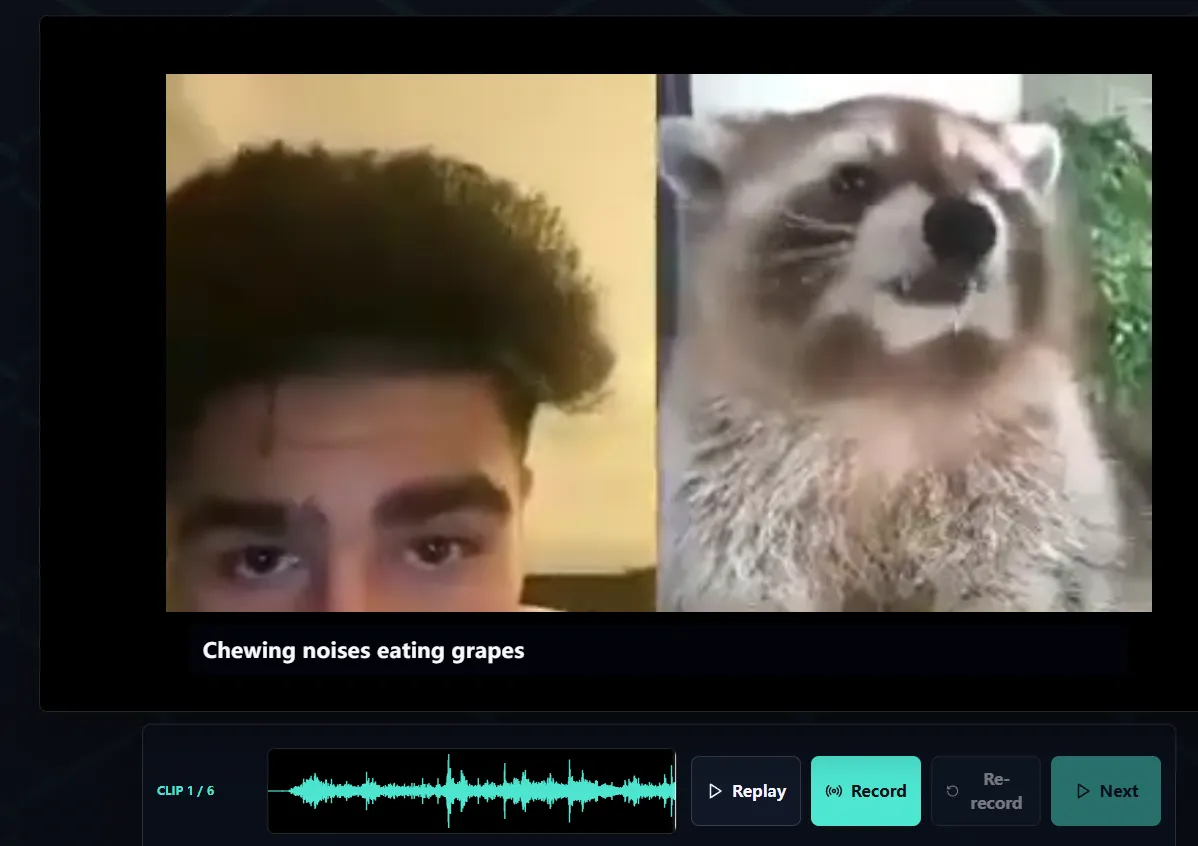
The game presents the scene around the current line so you can hear the original delivery and understand the timing. Read the caption and note where the character starts and stops speaking.
2. Record your delivery
Press Record and perform the displayed line into the selected microphone. A moving waveform is the quickest sign that Voxalike is receiving audio. Aim for a clear voice with a little space between your mouth and the mic; shouting directly into a laptop microphone usually creates distortion rather than a better take.
3. Replay or retry
Listen to the recorded line before accepting it. Retry if the beginning is cut off, the voice is too quiet, the wrong microphone was selected, or the performance lands outside the scene timing. A retry replaces the current attempt, so decide before continuing.
4. Continue through the pack
Accept the line and repeat the process for the remaining prompts. In Single Player you perform every role. Co-op can distribute lines between players, while PVP gives players comparable material and reveals results after their takes.
5. Watch the premiere
After the last accepted line, Voxalike combines the scene with the recorded performances in your browser. Keep the tab open and visible while it renders. The finished result can then be replayed and saved locally.
Controls that matter most
| Control | What it does | Use it when |
|---|---|---|
| Mic Check | Tests the chosen input before play | The meter is silent, too low, or clipping |
| Record | Captures the current line | You are ready to perform the prompt |
| Replay | Plays the take you just recorded | You want to check timing and volume |
| Retry | Replaces the current take | Audio is missing, clipped, or off-time |
| Continue | Locks the take and advances | You are happy to use the recording |
| Download | Saves the completed result locally | The premiere has finished rendering |
Browser labels may move as the public alpha changes, but the decision is the same: test first, record, listen, then accept.
How scoring fits into the game
Voxalike can present a score and a themed judge reveal after performances. Treat that result as party-game feedback, not a professional evaluation of acting skill. Judge Mods can change the presentation, images, sounds, and feedback text around the reveal; they do not rewrite the underlying game rules or scoring.
If you are learning a difficult pack, prioritize clean audio and readable timing over chasing a number. A good workflow is to complete one uninterrupted run, identify the hardest two lines, then replay the pack and focus your retries there.
Save the finished dub safely
The completed video is assembled locally, so do not close the tab while the final scene is being prepared. When the download control appears, save the file immediately to a folder you can find again. Browser downloads may use WebM, and available audio/video options can depend on the pack and browser.
For multiplayer sessions, the game also keeps a small Recent Dubs safety net. It is temporary rather than an archive: it holds only a limited number of recent completed results in the same browser profile. Download the result during the session whenever possible.
A good first-run checklist
- Use the official HTTPS game page in an up-to-date desktop browser.
- Wear headphones and close other apps that may control the microphone.
- Install one short Workshop pack in the browser you will play with.
- Run Mic Check and speak at normal performance volume.
- Replay the first line before accepting it.
- Keep the game tab visible during the final render.
- Download the completed result before starting another session.
Once that loop works in Single Player, move to the multiplayer guide for room modes, mod matching, and recovery steps.